Payout
When performing a payout, the customer initiates a payout and then just waits for the funds to be credited to their account. The customer themself doesn't participate in the payout processing procedure.
| Countries and regions | Indonesia |
| Payment currencies | IDR |
| Payment amount limits | Contact your key account manager at Monetix for details. Also you can check the payment amount limits in your project by using Dashboard. |
| Payment processing time | Contact your key account manager at Monetix for details. |
| Currency conversion | On the Monetix side |
| Refund |  |
| Onboarding and access fee | Contact your key account manager at Monetix for details. |
Special considerations
| |
Operations support
| Interfaces | |||
|---|---|---|---|
| Payment Page | Gate | Dashboard | |
| Payout | |
 |
|
You can check the payment amount limits in your project by using Dashboard. To check your payment amount limits, go to Dashboard, select the Projects section, and then click the Payment methods tab.
The following sections provide more information about the payment processing flow and the analysis of completed payments.
Payout by using Gate
General information
To perform a payout by using Gate with the Banks of Indonesia payment method:
- Send a request with all the required parameters and signature to the Monetix URL.
- Accept the callback with the payout result from the payment platform.
The following picture provides the details of the payout processing flow in the Banks of Indonesia payment method.
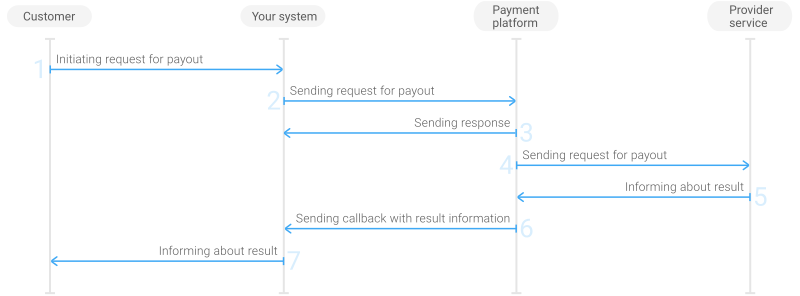
- The customer initiates a payout in your system.
- Your system sends the payout request to the Monetix payment platform.
- The payment platform sends you a response in which it acknowledges your request and provides the request validation result. (For more information about the response format, see Response structure.)
- The payment platform processes the request and forwards it to the bank service.
- The bank service informs the payment platform about the payout result.
- The payment platform sends a callback with the payout result to your system.
- Your system sends the payout result to the customer.
Request
This section provides the instructions on how to build the request for payout with the Banks of Indonesia payment method.
| HTTP request method | POST |
| Request body format | JSON |
| API endpoint | /v2/payment/banks/indonesia/payout |
| Full API endpoint specification | /v2/payment/banks/{payment_method}/payout |
|
|||
|---|---|---|---|
| Object | Parameter | Description | |
general | project_id | Project ID you obtained from Monetix when integrating. Example: | |
payment_id | Payment ID unique within your project. Example: | ||
signature | Signature created after you've specified all the request parameters. For more information about signature generation, see Signature generation and verification. | ||
customer | id | Unique ID of the customer within your project. Example: | |
ip_address | IP address of the customer's device. Example: | ||
email | Customer's email. Example: | ||
phone | Customer's phone number without a plus sign (+), spaces and punctuation. Example: | ||
account | number | Customer's account number. Example: | |
bank_id | Customer's bank ID. For information on how to get the list of the supported banks IDs, see Banks available for payout. Example: | ||
customer_name | Customer's full name. Example: | ||
payment | currency | Code of the payment currency in the ISO-4217 alpha-3 format. Example: | |
amount | Payment amount in minor currency units without any decimal point or comma except for the cases when the currency doesn't have any minor currency units. If the currency doesn't have any minor units (i.e. the number of digits for minor currency units is zero), set this parameter to the amount in the major currency units. To check whether the currency has any minor units, see Currency units and Currency codes. Example: 100.00 IDR must be sent as | ||
| You can also add any other optional parameters to the payout request, if necessary. For the list of all the parameters available in Gate, see API Reference. | |||
Here is an example of the data from a request to initiate a payout with the Banks of Indonesia payment method:
{
    "general": {
        "project_id": 1234,
        "payment_id": "payment_47",
        "signature": "kUi2x9dKHAVNU0FYldJrxh4yo+52Kt8KU+Y19vySO/RLUkDJrOcZzUCwX6R/ekpZhkIQg=="
    },
    "customer": {
        "id": "customer_123",
        "ip_address": "198.51.100.47",
        "email": "johndoe@example.com",
        "phone": "1234567"
    },
    "account": {
        "number": "123456",
        "bank_id": 61021,
        "customer_name": "John Doe"
    },
    "payment": {
        "currency": "IDR",
        "amount": 10000
    }
}
Callback
In the Banks of Indonesia payment method, the payment platform returns the payout result in a callback. For the information about the callback structure, see Callbacks in Gate.
The operation.sum_converted.amount parameter indicates the amount in major currency units converted and/or rounded up.
The following is an example of a callback body with the information about a successfully completed payout.
{
    "project_id": 1234,
    "payment": {
        "id": "payment_47",
        "type": "payout",
        "status": "success",
        "date": "2024-12-07T19:08:45+0000",
        "method": "Indonesian banks",
        "sum": {
            "amount": 10000,
            "currency": "IDR"
        },
        "description": ""
    },
    "customer": {
        "id": "customer_123"
    },
    "operation": {
        "id": 47,
        "type": "payout",
        "status": "success",
        "date": "2024-12-07T19:08:45+0000",
        "created_date": "2024-12-07T19:08:05+0000",
        "request_id": "1a23456bc7890de",
        "sum_initial": {
            "amount": 10000,
            "currency": "IDR"
        },
        "sum_converted": {
            "amount": 100,
            "currency": "IDR"
        },
        "code": "0",
        "message": "Success",
        "provider": {
            "id": 12345,
            "payment_id": "123abc123-123",
            "auth_code": ""
        }
    },
    "signature": "U7HQO7ToISZhMPKdM4XrUKQtoYzFvoB3cs9CRd4xeYG2Q=="
}
The following is an example of a callback for a declined payout.
{
    "project_id": 1234,
    "payment": {
        "id": "payment_47",
        "type": "payout",
        "status": "decline",
        "date": "2024-12-07T19:08:45+0000",
        "method": "Indonesian banks",
        "sum": {
            "amount": 10000,
            "currency": "IDR"
        },
        "description": ""
    },
    "customer": {
        "id": "customer_123"
    },
    "operation": {
        "id": 47,
        "type": "payout",
        "status": "decline",
        "date": "2024-12-07T19:08:45+0000",
        "created_date": "2024-12-07T19:08:05+0000",
        "request_id": "1a23456bc7890de",
        "sum_initial": {
            "amount": 10000,
            "currency": "IDR"
        },
        "sum_converted": {
            "amount": 100,
            "currency": "IDR"
        },
        "code": "20000",
        "message": "General decline",
        "provider": {
            "id": 12345,
            "payment_id": "123abc123-123",
            "auth_code": ""
        }
    },
    "signature": "U7HQO7ToISZhMPKdM4XrUKQtoYzFvoB3cs9CRd4xeYG2Q=="
}
Testing
You can test payouts with the Banks of Indonesia payment method by using Gate.
To start performing test payouts, reach out to the Monetix (support@monetix.pro) support team to get the test project ID and a secret key to it and to set up the test environment for the payouts to be performed with the Banks of Indonesia payment method.
When performing test payouts, keep in mind that:
- for the project ID you have to submit the ID of the test project
- for the ID of your customer's bank you should submit
396 - for the payment ID and customer's data you can submit any random values
Statuses of test payouts
To receive a certain final status when performing test payouts with the Banks of Indonesia payment method, your request has to contain a respective payment amount in it. The table below lists the payout amounts you can send in requests in order to get a certain status of a test payout.
| Payout amount | Final status |
|---|---|
| 40000 or 40400 | decline—the payout is declined |
| Any other amount | success—the payout is successful |
Testing payout by using Gate
To perform a test payout by using Gate:
- Send a correct test request for payout to the payment platform.
- Accept a callback containing the data about the result of performing a test payout.
To learn more about performing payouts with the Banks of Indonesia payment method by using Gate, see the Payout by using Gate section.
Payout by using Dashboard
- single payout—you specify the currency and amount for a payout available for this method and fill in all the fields required for the selected payment method on the Dashboard pages.
- as a part of a mass payment—all the parameters are specified in a CSV file. Refer to the Payouts by using Gate section for the parameters required by your payment method.
Information about completed payouts is available for viewing in the Payments and Manual Payments sections of Dashboard.
For more information about payout processing by using Dashboard, see Performing payouts.
Banks available for payout
Supported banks
In the Banks of Indonesia payment method, payments are performed through the banks the payment method supports. For the payout to be performed, your request must contain the ID of the customer's bank in the account.bank_id parameter.
The table below lists the banks available for payout in the Banks of Indonesia payment method.
| Bank | ID |
|---|---|
| ABN Amro | 63531 |
| Andara | 63361 |
| Anglomas International | 63331 |
| Arta Niaga Kencana | 63471 |
| Bangkok | 63341 |
| Bank Aceh Syariah | 60101 |
| Bank ANZ Indonesia | 60121 |
| Bank Artha Graha | 512 |
| BANK ARTOS/BANK JAGO | 69181 |
| Bank BCA Syariah | 555 |
| Bank Bengkulu | 4241 |
| Bank Bisnis International | 60151 |
| Bank BPD Banten | 60551 |
| Bank BPD Daerah Istimewa Yogyakarta | 69411 |
| Bank BPD NTB | 60671 |
| Bank BRI Agroniaga | 60441 |
| Bank Buana IND | 77546 |
| Bank Bukopin | 549 |
| Bank Bukopin Syariah | 4381 |
| Bank Bumi Arta | 4181 |
| Bank Capital Indonesia | 60171 |
| Bank Central Asia | 140 |
| Bank Centratama Nasional | 557 |
| Bank China Construction Indonesia | 60191 |
| Bank Chinatrust Indonesia | 566 |
| Bank CIMB Niaga | 507 |
| Bank CIMB Niaga Syariah | 60801 |
| Bank Commonwealth | 567 |
| Bank Danamon Indonesia | 398 |
| Bank Danamon Syariah | 558 |
| Bank DBS Indonesia | 514 |
| Bank DKI | 4191 |
| Bank EKA | 69161 |
| Bank Ekonomi | 77566 |
| Bank Ganesha | 4301 |
| Bank Hana | 551 |
| Bank Harda | 2731 |
| Bank Harmoni International | 60251 |
| Bank HSBC | 513 |
| Bank ICBC | 4311 |
| Bank IFI | 77586 |
| Bank Ina Perdana | 4371 |
| Bank Index Selindo | 4401 |
| Bank International Indonesia (BII MayBank) | 505 |
| Bank Jabar Banten Syariah | 546 |
| Bank Jasa Jakarta | 4331 |
| Bank Jenius BTPN | 77526 |
| Bank Maliku | 4221 |
| Bank Mandiri | 143 |
| Bank Mantap | 69221 |
| Bank Maspion | 2891 |
| Bank Mayapada International | 519 |
| Bank MayBank Indonesia | 565 |
| Bank MayBank Indonesia Syariah | 559 |
| Bank Mayora | 556 |
| Bank Mega | 547 |
| Bank Mestika | 4281 |
| Bank Muamalat Indonesia | 539 |
| Bank Multi Arta Sentosa | 60351 |
| Bank MULTICOR | 69231 |
| Bank Mutiara | 518 |
| Bank Nagari (BPD Sumbar) | 526 |
| Bank National Nobu | 553 |
| Bank Negara Indonesia | 141 |
| Bank Negara Indonesia Syariah | 548 |
| Bank NTP | 77646 |
| Bank NTT | 537 |
| Bank Nusantara Parahyangan | 538 |
| Bank OCBC NISP | 509 |
| Bank of China Limited | 4171 |
| Bank of India Indonesia | 60401 |
| Bank Panin | 506 |
| Bank Permata | 396 |
| Bank Permata Syariah | 560 |
| Bank Prima Master | 60421 |
| Bank Rakyat Indonesia | 142 |
| Bank Rakyat Indonesia Syariah | 545 |
| Bank Resona Perdania | 60841 |
| Bank Sahabat Sampoerna | 60461 |
| Bank Saudara | 543 |
| Bank SBI | 4351 |
| Bank Shinhan Indonesia | 60311 |
| Bank Sinamars Syariah | 562 |
| Bank Sinarmas | 540 |
| Bank Standard Chartered | 515 |
| Bank Sulselbar | 60831 |
| Bank Sulteng | 69351 |
| Bank Sultra | 4261 |
| Bank Sumut | 525 |
| Bank Syariah Indonesia (BSI) | 69041 |
| Bank Syariah Mega | 554 |
| Bank Tabungan Negara (BTN) | 399 |
| Bank Tabungan Negara Syariah (BTN) | 561 |
| Bank Tabungan Pensiunan Nasional /BTPN | 544 |
| Bank UOB Buana Indonesia | 508 |
| Bank Victoria International | 60481 |
| Bank Victoria Syariah | 4321 |
| Bank Windu Kencana | 511 |
| Bank Woori Saudara Indonesia 1906 | 60501 |
| Bank Yudha Bhakti | 60511 |
| BJB Syariah | 63481 |
| Blu/BCA Digital | 69321 |
| BNP Paribas | 2711 |
| BPD Aceh | 524 |
| BPD BALI | 536 |
| BPD DIY | 69111 |
| BPD JAMBI | 4201 |
| BPD Jawa Barat (Bank BJB) | 520 |
| BPD Jawa Tengah | 522 |
| BPD Jawa Timur (Bank JATIM) | 523 |
| BPD Kalimantan Barat | 531 |
| BPD Kalimantan Selatan | 530 |
| BPD Kalimantan Tengah | 63421 |
| BPD Kalimantan Timur | 532 |
| BPD Lampung | 529 |
| BPD Nusa Tenggara Barat | 535 |
| BPD Papua | 4231 |
| BPD Riau | 527 |
| BPD Sulawesi Selatan dan Barat | 533 |
| BPD Sulawesi Tengah (Bank Sulteng) | 4251 |
| BPD Sulawesi Utara | 534 |
| BPD Sumatera Selatan | 528 |
| BPD Sumsel Dan Babel | 63441 |
| BPD Yogyakarta | 521 |
| BPR Karyajatnika Sadaya | 63491 |
| CIMB Clicks Indonesia | 397 |
| CITIBank | 510 |
| Deutsche Bank AG | 516 |
| Dinar | 63371 |
| DOKU | 564 |
| Ekspor Indonesia | 63461 |
| Haga | 77576 |
| Hagakita | 77606 |
| IBK | 63351 |
| ICB Bumiputera | 552 |
| J Trust | 63381 |
| Korea Exchange Bank Danamon | 63541 |
| Metro Express | 63501 |
| MNC Bank | 21781 |
| OCBC NISP Syariah | 563 |
| Panin Dubai Syariah | 69281 |
| Pembangunan Daerah | 63411 |
| QNB Kesawan | 541 |
| RaboBank | 517 |
| Seabank | 69712 |
| Sinar Harapan Bali | 63511 |
| Sri Partha | 77626 |
| Standard Charted | 63451 |
| Sulutgo | 63431 |
| Sumber Babel | 77636 |
| Sumitomo Mitsui | 63401 |
| Swadesi | 77596 |
| Swaguna | 77616 |
| The Bank of Tokyo Mitsubishi UFJ Ltd | 4151 |
| J Trust Bank (formerly Bank Mutiara) | 518 |
| Windu Kentjana Int | 63521 |
The table with the list of banks is provided for informational purposes only. It may change without notice. To get the current list of banks the Banks of Indonesia payment method supports, send a request to the payment platform.
Request for the list of available banks
The list of banks may change that's why we recommend that you send the payment platform a request for the list of banks currently available in the Banks of Indonesia payment method. The request format and structure should be the following:
| HTTP request method | POST |
| Request body format | JSON |
| API endpoint |
/v2/info/banks/indonesia/payout/list
|
| Full API endpoint specification | /v2/info/banks/{payment_method}/{operationType}/list |
|
|||
|---|---|---|---|
| Object | Parameter | Description | |
|
general |
project_id |
Project ID you obtained when integrating with Monetix.
Example: |
|
|
payment_id |
Payment ID unique within the project.
If the payment is not yet created, set this parameter to a unique value. Example: |
||
|
signature |
Signature created after you specify all the required parameters. For more information about, signature generation, see Signature generation and verification. | ||
|
payment |
amount |
Payment amount in minor currency units without any decimal point or comma except for the cases when the currency doesn't have any minor currency units. If the currency doesn't have any minor units (i.e. the number of digits for minor currency units is zero), set this parameter to the amount in the major currency units. To check whether the currency has any minor units, see Currency codes. Example: 100.00 IDR must be sent
as |
|
|
currency |
Code of the payout currency in the ISO-4217 alpha-3 format.
Example: |
||
| You can also add any other optional parameters to the request, if necessary. For the list of all the parameters available in Gate, see API Reference. | |||
Here is an example of the data from the request for the list of banks available in the Banks of Indonesia payment method.
{
    "general": {
        "project_id": 200,
        "payment_id": "ORDER_155860015",
        "signature": "K6jll2ym+PtOb3ocZtr345st...=="
    },
    "payment": {
        "amount": 10000,
        "currency": "IDR"
    }
}
[
    {
        "minAmount": 100, // Minimum payment amount allowed for the payment (in minor currency units)
        "maxAmount": 1000, // Maximum payment amount allowed for the payment (in minor currency units)
        "limitCurrency": "IDR", // Code of the currency used for the payment limits (minAmount and maxAmount) in the ISO-4217 alpha-3 format
        "id": 123, // Bank ID
        "abbr": "EXB", // Bank shortcut name (for internal use)
        "name": "Example Bank", // General bank name
        "nativeName": "Example Bank", // Native bank name
        "currencies": [ // Array with currencies supported by the bank
            {
                "id": 123, // Currency ID in the payment platform
                "alpha_3_4217": "IDR", // Alphabetic code of the payment currency in the ISO-4217 alpha-3 format
                "number_3_4217": "123", // Numeric code of the payment currency in the ISO-4217 alpha-3 format
                "currency_type": "fiat", // Type of the currency
                "exponent": 2 // Number of decimal places after decimal point
            }
        ]
    }
]