Payout
When performing a payout, the customer initiates a payout and then just waits for the funds to be credited to their account. The customer themself doesn't participate in the payout processing procedure.
| Countries and regions | Philippines |
| Payment currencies | PHP |
| Payment amount limits | Contact your key account manager at Monetix for details. Also you can check the payment amount limits in your project by using Dashboard. |
| Payment processing time | Contact your key account manager at Monetix for details. |
| Currency conversion | On the Monetix side |
| Refund |  |
| Onboarding and access fee | Contact your key account manager at Monetix for details. |
Operations support
| Interfaces | |||
|---|---|---|---|
| Payment Page | Gate | Dashboard | |
| Payout | |
 |
|
You can check the payment amount limits in your project by using Dashboard. To check your payment amount limits, go to Dashboard, select the Projects section, and then click the Payment methods tab.
The following sections provide more information about the payment processing flow and the analysis of completed payments.
Payout by using Gate
General information
To perform a payout by using Gate with the Philippines Payment Centers payment method:
- Send a request with all the required parameters and signature to the Monetix URL.
- Accept the callback with the payout result from the payment platform.
The following picture provides the details of the payout processing flow in the Philippines Payment Centers payment method.
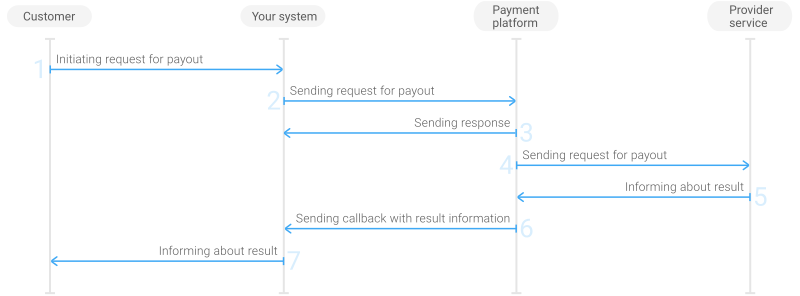
- The customer initiates a payout in your system.
- Your system sends the payout request to the Monetix payment platform.
- The payment platform sends you a response in which it acknowledges your request and provides the request validation result. (For more information about the response format, see Response structure.)
- The payment platform processes the request and forwards it to the provider service.
- The provider service informs the payment platform about the payout result.
- The payment platform sends a callback with the payout result to your system.
- Your system sends the payout result to the customer.
Request
This section provides the instructions on how to build the request for payout with the Philippines Payment Centers payment method.
| HTTP request method | POST |
| Request body format | JSON |
| API endpoint | /v2/payment/cash/philippines/payout |
| Full API endpoint specification | /v2/payment/cash/{payment_method}/payout |
|
|||
|---|---|---|---|
| Object | Parameter | Description | |
general | project_id | Project ID you obtained from Monetix when integrating. Example: | |
payment_id | Payment ID unique within your project. Example: | ||
signature | Signature created after you've specified all the request parameters. For more information about signature generation, see Signature generation and verification. | ||
customer | id | Unique ID of the customer within your project. Example: | |
ip_address | IP address of the customer's device. Example: | ||
first_name | Customer's first name. Example: | ||
last_name | Customer's last name. Example: | ||
email | Customer's email. Example: | ||
phone | Customer phone number. Example: | ||
day_of_birth | Customer's date of birth, in the DD-MM-YYYY format. Example: | ||
address | Customer's address of residence. Example: | ||
city | Customer's city of residence. Example: | ||
country | Customer's country of residence. Example: | ||
state | Customer's state or region of residence. Example: | ||
district | Customer's district of residence. Example: | ||
citizenship | Customer's state of citizenship. Example: | ||
account | bank_id | Cash pick-up point service ID. Example: | |
payment | currency | Code of the payment currency in the ISO-4217 alpha-3 format. Example: | |
amount | Payment amount in minor currency units without any decimal point or comma except for the cases when the currency doesn't have any minor currency units. If the currency doesn't have any minor units (i.e. the number of digits for minor currency units is zero), set this parameter to the amount in the major currency units. To check whether the currency has any minor units, see Currency units and Currency codes. Example: 10.00 PHP must be sent as | ||
description | Operation description. Example: | ||
| You can also add any other optional parameters to the payout request, if necessary. For the list of all the parameters available in Gate, see API Reference. | |||
Here is an example of the data from a request to initiate a payout with the Philippines Payment Centers payment method:
{
    "general": {
        "project_id": 1234,
        "payment_id": "payment_47",
        "signature": "kUi2x9dKHAVNU0FYldJrxh4yo+52Kt8KU+Y19vySO/RLUkDJrOcZzUCwX6R/ekpZhkIQg=="
    },
    "customer": {
        "id": "customer_123",
        "ip_address": "198.51.100.47",
        "first_name": "John",
        "last_name": "Doe",
        "email": "johndoe@example.com",
        "phone": "6312345678",
        "day_of_birth": "29-12-1984",
        "address": "123 Sesame street",
        "city": "Pasig",
        "country": "PH",
        "state": "Metro Manila",
        "district": "Udong",
        "citizenship": "Philippines"
    },
    "account": {
        "bank_id": 1621
    },
    "payment": {
        "currency": "PHP",
        "amount": 1000,
        "description": "Description"
    }
}
Callback
In the Philippines Payment Centers payment method, the payment platform returns the payout result in a callback. For the information about the callback structure, see Callbacks in Gate.
The following is an example of a callback body with the information about a successfully completed payout.
{
    "project_id": 1234,
    "payment": {
        "id": "payment_47",
        "type": "payout",
        "status": "success",
        "date": "2024-12-07T19:08:45+0000",
        "method": "Philippines Cash",
        "sum": {
            "amount": 1000,
            "currency": "PHP"
        },
        "description": ""
    },
    "customer": {
        "id": "customer_123"
    },
    "operation": {
        "id": 47,
        "type": "payout",
        "status": "success",
        "date": "2024-12-07T19:08:45+0000",
        "created_date": "2024-12-07T19:08:05+0000",
        "request_id": "1a23456bc7890de",
        "sum_initial": {
            "amount": 1000,
            "currency": "PHP"
        },
        "sum_converted": {
            "amount": 1000,
            "currency": "PHP"
        },
        "code": "0",
        "message": "Success",
        "provider": {
            "id": 12345,
            "payment_id": "123abc123-123",
            "auth_code": ""
        }
    },
    "signature": "U7HQO7ToISZhMPKdM4XrUKQtoYzFvoB3cs9CRd4xeYG2Q=="
}
The following is an example of a callback for a declined payout.
{
    "project_id": 1234,
    "payment": {
        "id": "payment_47",
        "type": "payout",
        "status": "decline",
        "date": "2024-12-07T19:08:45+0000",
        "method": "Philippines Cash",
        "sum": {
            "amount": 1000,
            "currency": "PHP"
        },
        "description": ""
    },
    "customer": {
        "id": "customer_123"
    },
    "operation": {
        "id": 47,
        "type": "payout",
        "status": "decline",
        "date": "2024-12-07T19:08:45+0000",
        "created_date": "2024-12-07T19:08:05+0000",
        "request_id": "1a23456bc7890de",
        "sum_initial": {
            "amount": 1000,
            "currency": "PHP"
        },
        "sum_converted": {
            "amount": 1000,
            "currency": "PHP"
        },
        "code": "20000",
        "message": "General decline",
        "provider": {
            "id": 12345,
            "payment_id": "123abc123-123",
            "auth_code": ""
        }
    },
    "signature": "U7HQO7ToISZhMPKdM4XrUKQtoYzFvoB3cs9CRd4xeYG2Q=="
}
Payout by using Dashboard
- single payout—you specify the currency and amount for a payout available for this method and fill in all the fields required for the selected payment method on the Dashboard pages.
- as a part of a mass payment—all the parameters are specified in a CSV file. Refer to the Payouts by using Gate section for the parameters required by your payment method.
Information about completed payouts is available for viewing in the Payments and Manual Payments sections of Dashboard.
For more information about payout processing by using Dashboard, see Performing payouts.
Supported cash pick-up points services
Supported cash pick-up points services
Payments through the Philippines Payment Centers method are carried out through cash pick-up points services that work with the method. Each of service has its own ID that identifies it in the request of payout by using Gate.
The table below lists the cash pick-up points available for payout in the Philippines Payment Centers payment method.
| Cash pick-up points | ID |
|---|---|
| Cebuana Lhuillier Cash Pick-up | 1581 |
| LBC Cash Pick-up | 1591 |
| PeraHub Cash Pick-up | 1601 |
| RCBC/RCBC Savings Bank Cash Pick-up | 1611 |
| TrueMoney Cash Pick-up | 1621 |
The table with the list of cash pick-up points is provided for informational purposes only. It may change without notice. To get the current list of cash pick-up points the Philippines Payment Centers payment method supports, send a request to the payment platform.
Request for the list of available cash pick-up points
The list of cash pick-up points may change that's why we recommend that you send the payment platform a request for the list of cash pick-up points currently available in the Philippines Payment Centers payment method. The request format and structure should be the following:
| HTTP request method | POST |
| Request body format | JSON |
| API endpoint |
/v2/info/banks/cash/philippines/payout/list
|
| Full API endpoint specification | /v2/info/banks/{parentMethod}/{childMethod}/{operationType}/list |
|
|||
|---|---|---|---|
| Object | Parameter | Description | |
|
general |
project_id |
Project ID you obtained when integrating with Monetix.
Example: |
|
|
payment_id |
Payment ID unique within the project.
If the payment is not yet created, set this parameter to a unique value. Example: |
||
|
signature |
Signature created after you specify all the required parameters. For more information about, signature generation, see Signature generation and verification. | ||
|
payment |
amount |
Payment amount in minor currency units without any decimal point or comma except for the cases when the currency doesn't have any minor currency units. If the currency doesn't have any minor units (i.e. the number of digits for minor currency units is zero), set this parameter to the amount in the major currency units. To check whether the currency has any minor units, see Currency codes. Example: 10.00 PHP must be sent
as |
|
|
currency |
Code of the payout currency in the ISO-4217 alpha-3 format.
Example: |
||
| You can also add any other optional parameters to the request, if necessary. For the list of all the parameters available in Gate, see API Reference. | |||
Here is an example of the data from the request for the list of cash pick-up points available in the Philippines Payment Centers payment method.
{
	"general": {
		"project_id": 200,
		"payment_id": "ORDER_155860015",
		"signature": "K6jll2ym+PtOb3ocZtr345st...=="
	},
	"payment": {
		"amount": 1000,
		"currency": "PHP"
	}
}
[
	{
		"minAmount": 100, // Minimum payment amount allowed for the payment (in minor currency units)
		"maxAmount": 1000, // Maximum payment amount allowed for the payment (in minor currency units)
		"limitCurrency": "PHP", // Code of the currency used for the payment limits (minAmount and maxAmount) in the ISO-4217 alpha-3 format
		"id": 123, // Bank ID
		"abbr": "EXB", // Cash pick-up point shortcut name (for internal use)
		"name": "Example Bank", // General cash pick-up point name
		"nativeName": "Example Bank", // Native cash pick-up point name
		"currencies": [ // Array with currencies supported by the cash pick-up point
			{
				"id": 123, // Currency ID in the payment platform
				"alpha_3_4217": "PHP", // Alphabetic code of the payment currency in the ISO-4217 alpha-3 format
				"number_3_4217": "123", // Numeric code of the payment currency in the ISO-4217 alpha-3 format
				"currency_type": "fiat", // Type of the currency
				"exponent": 2 // Number of decimal places after decimal point
			}
		]
	}
]