Purchase 1: with confirmation via USSD
When performing a purchase, the customer confirms the payment via USSD message which they receive from the provider service.
| Countries and regions | Burkina Faso, Benin, Democratic Republic of the Congo, The Congo, Ivory Coast, Cameroon, Ghana, Gambia, Kenya, Rwanda, Senegal, Togo, Tanzania, Uganda, Zambia |
| Payment currencies | CDF, GHS, GMD, KES, RWF, TZS, UGX, XAF, XOF, ZMW |
| Payment amount limits | Contact your key account manager at Monetix for details. Also you can check the payment amount limits in your project by using Dashboard. |
| Payment processing time | Contact your key account manager at Monetix for details. |
| Currency conversion | On the Monetix side |
| Refund |  |
| Onboarding and access fee | Contact your key account manager at Monetix for details. |
Special considerations
| |
Operations support
| Interfaces | |||
|---|---|---|---|
| Payment Page | Gate | Dashboard | |
| Purchase |  |
|
|
You can check the payment amount limits in your project by using Dashboard. To check your payment amount limits, go to Dashboard, select the Projects section, and then click the Payment methods tab.
The following sections provide more information about the payment processing flow and the analysis of completed payments.
Supported mobile network operators
The table below lists the mobile network operators available for performing purchase with the Mobile Commerce in Africa (Redirect) payment method.
| Mobile network operator | ID | Countries | Currencies |
|---|---|---|---|
| Africell | AFRICELL |
Democratic Republic of the Congo, Gambia | CDF, GMD |
| Airtel | AIRTEL | Democratic Republic of the Congo, Kenya, Rwanda, Tanzania, Uganda, Zambia | CDF, KES, RWF, UGX, TZS, ZMW |
| CELTIIS | CELTIIS |
Benin | XOF |
| Free | FREEMONEY |
Senegal | XOF |
| HaloPesa | HALOPESA | Tanzania | TZS |
| MTN | MTN | Benin, Cameroon, Ivory Coast, Rwanda, The Congo, Ghana, Uganda, Zambia | GHS, RWF, UGX, XAF, XOF, ZMW |
| Moov | MOOV |
Benin, Burkina Faso, Ivory Coast, Togo | XOF |
| M-Pesa | MPESA | Kenya, Tanzania | KES, TZS |
| Orange | ORANGE | Ivory Coast | XOF |
| Telecel | TELECEL | Ghana | GHS |
| Vodacom | VODACOM |
Tanzania | TZS |
| Yas | YAS | Tanzania, Togo | TZS, XOF |
| Zamtel | ZAMTEL |
Zambia | ZMW |
Note that the list of mobile network operators in the table is provided for informational purposes only. To get the current list of mobile network operators, contact your key account manager at Monetix.
Purchase by using Payment Page
General information
To perform a purchase by using Payment Page with the Mobile Commerce in Africa (Redirect) payment method:
- Send a request with all the required parameters and signature to the Monetix URL.
- Accept the callback with the purchase result from the payment platform.
The following figure shows the complete purchase processing flow in the Mobile Commerce in Africa (Redirect) payment method.
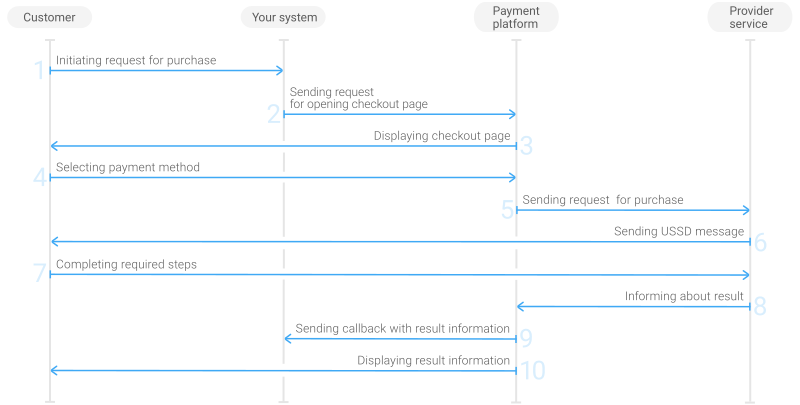
- The customer initiates a purchase in your system.
- Your system sends the request for the purchase through Payment Page to the Monetix URL.
- The checkout page is displayed to the customer.
- The customer chooses to make a purchase with the Mobile Commerce in Africa (Redirect) payment method.
- The payment platform processes the request and forwards it to the provider service.
- The provider service sends the USSD message to the customer to confirm the payment.
- The customer completes the purchase.
- The provider service sends the purchase result information to the payment platform.
- The payment platform sends a callback with the payment result to your system.
- The payment platform displays the payment result to the customer on the checkout page.
Request
The following table lists the parameters that you have to include in the request for purchase through the checkout page with the Mobile Commerce in Africa (Redirect) payment method.
|
||
|---|---|---|
| Parameter | Description | |
project_id | Project ID you obtained from Monetix when integrating. Example: | |
payment_id | Payment ID unique within your project. Example: | |
customer_id | Unique ID of the customer within your project. Example: | |
customer_first_name | Customer's first name. Example: | |
customer_last_name | Customer's last name. Example: | |
customer_email | Customer's email. Example: | |
payment_currency | Code of the payment currency in the ISO-4217 alpha-3 format.
Example: | |
payment_amount | Payment amount in minor currency units without any decimal point or comma except for the cases when the currency doesn't have any minor currency units. If the currency doesn't have any minor units (i.e. the number of digits for minor currency units is zero), set this parameter to the amount in the major currency units. To check whether the currency has any minor units, see Currency units and Currency codes. Note: Your requests should contain only integer payment amounts in them. For example, instead of passing 105.70 ( 10570) GHS in your request, pass 105.00 (10500) or 106.00 (10600) GHS in it.Example: 100.00 GHS must be sent as | |
force_payment_method | Parameter that allows you to enforce the Mobile Commerce in Africa (Redirect) payment method for your customer and skip the page with payment method selections. To enforce the Mobile Commerce in Africa (Redirect) payment method and skip the page with payment method selection, add the force_payment_method parameter to the request and set its value to Example: | |
signature | Signature created after you've specified all the request parameters. For more information about signature generation, see Signature generation and verification. | |
| You can also add any other optional parameters to the request, if necessary. For the list of all the parameters possible in requests to Payment Page, see Payment Page invocation parameters. | ||
Here is an example of the data from a request to open the checkout page by using
EPayWidget:
EPayWidget.run(
	{
		project_id: 1234,
		payment_id: 'payment_47',
		customer_id: 'customer_123',
		customer_first_name: 'John',
		customer_last_name: 'Doe',
		customer_email: 'johndoe@example.com',
		payment_currency: 'GHS',
		payment_amount: 10000,
		force_payment_method: 'mobile',
		signature: 'kUi2x9dKHAVNU0FYldJrxh4yo+52Kt8KU+Y19vySO/RLUkDJrOcZzUCwX6R/ekpZhkIQg=='
	}
)
You can enforce a country or mobile network operator for your customer on the checkout page. To do so, add the following parameters to the request for the checkout page opening:
| Object/parameter | Parameter | Description |
|---|---|---|
| force_payment_method | Parameter that allows you to enforce the Mobile Commerce in Africa (Redirect) payment method for your customer and skip the page with payment method selections. Set the value of this parameter to Example: | |
| payment_methods_options | enable_mobile_service | Set the value of this parameter to 1 to enable enforcing a country or mobile network operator on the checkout page. |
| selected_operator | ID of the customer's mobile network operator. For the information on how to get the list of supported mobile network operators IDs, see Supported mobile network operators. Example: | |
| selected_country | Customer's country code in the ISO 3166-1 alpha-2 format. Example: | |
Here is an example of the data from the request to open the checkout page with a mobile network operator enforced for the customer:
EPayWidget.run(
	{
		project_id: 1234,
		payment_id: 'payment_47',
		customer_id: 'customer_123',
		customer_first_name: 'John',
		customer_last_name: 'Doe',
		customer_email: 'johndoe@example.com',
		payment_currency: 'GHS',
		payment_amount: 10000,
		force_payment_method: 'mobile',
		payment_methods_options: {"enable_mobile_service": 1, "selected_operator": "MTN"},
		signature: 'kUi2x9dKHAVNU0FYldJrxh4yo+52Kt8KU+Y19vySO/RLUkDJrOcZzUCwX6R/ekpZhkIQg=='
	}
)
Here is an example of the data from the request to open the checkout page with a country enforced for the customer:
EPayWidget.run(
	{
		project_id: 1234,
		payment_id: 'payment_47',
		customer_id: 'customer_123',
		customer_first_name: 'John',
		customer_last_name: 'Doe',
		customer_email: 'johndoe@example.com',
		payment_currency: 'GHS',
		payment_amount: 10000,
		force_payment_method: 'mobile',
		payment_methods_options: {"enable_mobile_service": 1, "selected_country": "GH"},
		signature: 'kUi2x9dKHAVNU0FYldJrxh4yo+52Kt8KU+Y19vySO/RLUkDJrOcZzUCwX6R/ekpZhkIQg=='
	}
)
Callback
In the Mobile Commerce in Africa (Redirect) payment method, the payment platform returns the purchase result in a callback. For the information about the callback structure, see Callbacks in Payment Page.
In this payment method, callbacks also have the account object with the number, customer_name, and type parameters containing information about the customer's phone number, their full name, and their mobile network operator. Customer name might not be present in the callback, contact your key account manager at Monetix for details.
The following is an example of a callback body with information about a successfully completed purchase.
{
    "project_id": 1234,
    "payment": {
        "id": "payment_47",
        "type": "purchase",
        "status": "success",
        "date": "2024-12-07T19:08:45+0000",
        "method": "mobile",
        "sum": {
            "amount": 10000,
            "currency": "GHS"
        },
        "description": ""
    },
    "customer": {
        "id": "customer_123"
    },
    "operation": {
        "id": 47,
        "type": "sale",
        "status": "success",
        "date": "2024-12-07T19:08:45+0000",
        "created_date": "2024-12-07T19:08:05+0000",
        "request_id": "1a23456bc7890de",
        "sum_initial": {
            "amount": 10000,
            "currency": "GHS"
        },
        "sum_converted": {
            "amount": 10000,
            "currency": "GHS"
        },
        "code": "0",
        "message": "Success",
        "provider": {
            "id": 12345,
            "payment_id": "123abc123-123",
            "auth_code": ""
        }
    },
    "account": {
        "number": "233123456789",
        "type": "MTN",
        "customer_name": "John Doe"
    },
    "signature": "U7HQO7ToISZhMPKdM4XrUKQtoYzFvoB3cs9CRd4xeYG2Q=="
}
The following is an example of a callback for a declined purchase.
{
    "project_id": 1234,
    "payment": {
        "id": "payment_47",
        "type": "purchase",
        "status": "decline",
        "date": "2024-12-07T19:08:45+0000",
        "method": "mobile",
        "sum": {
            "amount": 10000,
            "currency": "GHS"
        },
        "description": ""
    },
    "customer": {
        "id": "customer_123"
    },
    "operation": {
        "id": 47,
        "type": "sale",
        "status": "decline",
        "date": "2024-12-07T19:08:45+0000",
        "created_date": "2024-12-07T19:08:05+0000",
        "request_id": "1a23456bc7890de",
        "sum_initial": {
            "amount": 10000,
            "currency": "GHS"
        },
        "sum_converted": {
            "amount": 10000,
            "currency": "GHS"
        },
        "code": "20000",
        "message": "General decline",
        "provider": {
            "id": 12345,
            "payment_id": "123abc123-123",
            "auth_code": ""
        }
    },
    "account": {
        "number": "233123456789",
        "type": "MTN",
        "customer_name": "John Doe"
    },
    "signature": "U7HQO7ToISZhMPKdM4XrUKQtoYzFvoB3cs9CRd4xeYG2Q=="
}